[Note that CodeExam is still in development, with a private GitHub repository. A large portion of the repo will soon be made public. Contact Andrew Schulman (undoc at sonic dot net) if interested.]
CodeExam
CodeExam, as its name implies, is a tool for examining code — primarily source code, but with a growing emphasis on quasi-source: recovering indexable structure from artifacts that weren’t shipped as source (minified bundles, executables, embedded scripts). It runs as both a GUI and a CLI (plus an interactive REPL and an MCP server), all over one shared index.
At its core, CodeExam is language-broad: build an index over a codebase, then browse, full-text/regex/inverted-index search, and cross-reference (callers, callees, call trees, file/folder coupling) at scale — across C, C++, Java, JavaScript, TypeScript, Python, C#, Go, Rust, PHP, and Ruby (tree-sitter), with regex-level support for a dozen more. If you’ve used a code-comprehension tool like SciTools Understand, the browse-and-cross- reference surface will feel familiar.
What CodeExam emphasizes beyond that baseline:
- Quasi-source recovery — index minified/bundled JS, binaries (strings + demangled C++ symbols), and JavaScript extracted from native install executables, then search and cross-reference them with the same machinery as real source.
- Deobfuscation and fingerprinting — infer readable names for obfuscated code (on by default; toggle off with
--no-rename), and — work in progress — match a bundled function back to its source-library equivalent via transform-resilient “funcstrings” and portable fingerprint files. - Multisect — find the smallest scope (function / class / file) that contains substantially all of N terms, and parse prose (a patent claim, a spec, a bug report) directly into such a query.
- Catalogs — extract a codebase’s CLI commands, LLM prompts, and telemetry breadcrumbs, each linked back to its handler.
- Optional LLM assistance, including an air-gapped local-GGUF mode for code that must not be exposed in any way outside a protected computer.
A growing focus is examining AI-related software, and much of that is now in place. CodeExam ships a dedicated AI/ML and LLM-app detectors suite (see Feature highlights below) that surfaces inferred pipelines, the models a codebase defines and uses, LLM calls, tools, agents/chains, embeddings, and more — alongside LLM prompt extraction, stress-tested on large AI codebases such as Claude Code’s minified cli.js (≈14 MB, bundled with claude.exe) and Codex’s Rust source. It indexes the major ML framework and model trees (PyTorch, Hugging Face Transformers, scikit-learn; model repos such as DeepSeek, Qwen, Llama) with the same general machinery. This remains an area of active development: CodeExam is not yet ML-architecture-aware — it doesn’t render a model’s layer topology or catalog tensor shapes the way it renders call graphs — but that is a direction we’re actively building toward.
CodeExam is ~48,000 lines of JavaScript (engine + CLI + GUI) running under Node.js, developed in close collaboration with Claude Code: nearly all of the code was written by Claude Code, in several important places building on the main author’s earlier tooling (e.g. “Opstrings” and function digests, the “NiceDbg” debugger, and an ndx/find inverted-index search tool).
Four ways to use it
- CLI —
node src/index.js <command>for one-shot queries and scripting. Runnode src/index.js --helpfor the full command list. - Interactive REPL —
node src/index.js --interactive, then issue slash commands (/fast,/extract,/file-map,/help, …). The same REPL is also reachable from the GUI’s Console pane; a few commands (/file-mapetc.) are currently REPL-only. - GUI —
node src/server.js --port 3000opens a multi-pane interface served from localhost only (no remote access, no outbound network calls). Called “GUI” rather than “browser UI” because nothing about it is web-facing — it just happens to render in a local browser. Left pane: function/file/class accordions and other catalogs. Middle-top: output. Middle-bottom: source viewer with linkified call sites. A Workspace area collects what you’re actively examining. Mermaid call trees and file-coupling diagrams render inline. The GUI is gradually moving toward a newer design with less of a fixed three-pane layout (the goal being that many features operate as semi-independent mini-apps — so that, for example, multiple instances of a feature can run side-by-side for comparison, and long-running operations proceed on their own threads). - MCP server —
node src/mcp-server.jsexposes the indexed codebase as Model Context Protocol tools, so Claude Code or Claude Desktop (and presumably other MCP clients such as Codex, though that’s untested) can search, extract, and analyze it directly.
All four share the same CodeSearchIndex engine and the same on-disk index format. Build the index once; query from any of them.
A standalone codeexam.exe (see below) is not a fifth mode — it’s the same CLI and GUI packaged so they run without a Node install.
Quick start
# Build an index over a codebase (handles directories, zip/tar archives,
#
binary files, minified JS, and @filelist files)
node src/index.js --build-index /path/to/codebase
# Launch the GUI (localhost only)
node src/server.js --index-path .code_search_index --port 3000
# then open http://localhost:3000
Indexes scale to multi-gigabyte source trees (tested on Chromium — ~195K files, ~5 GB index, loaded with NODE_OPTIONS=--max-old-space-size=8192).
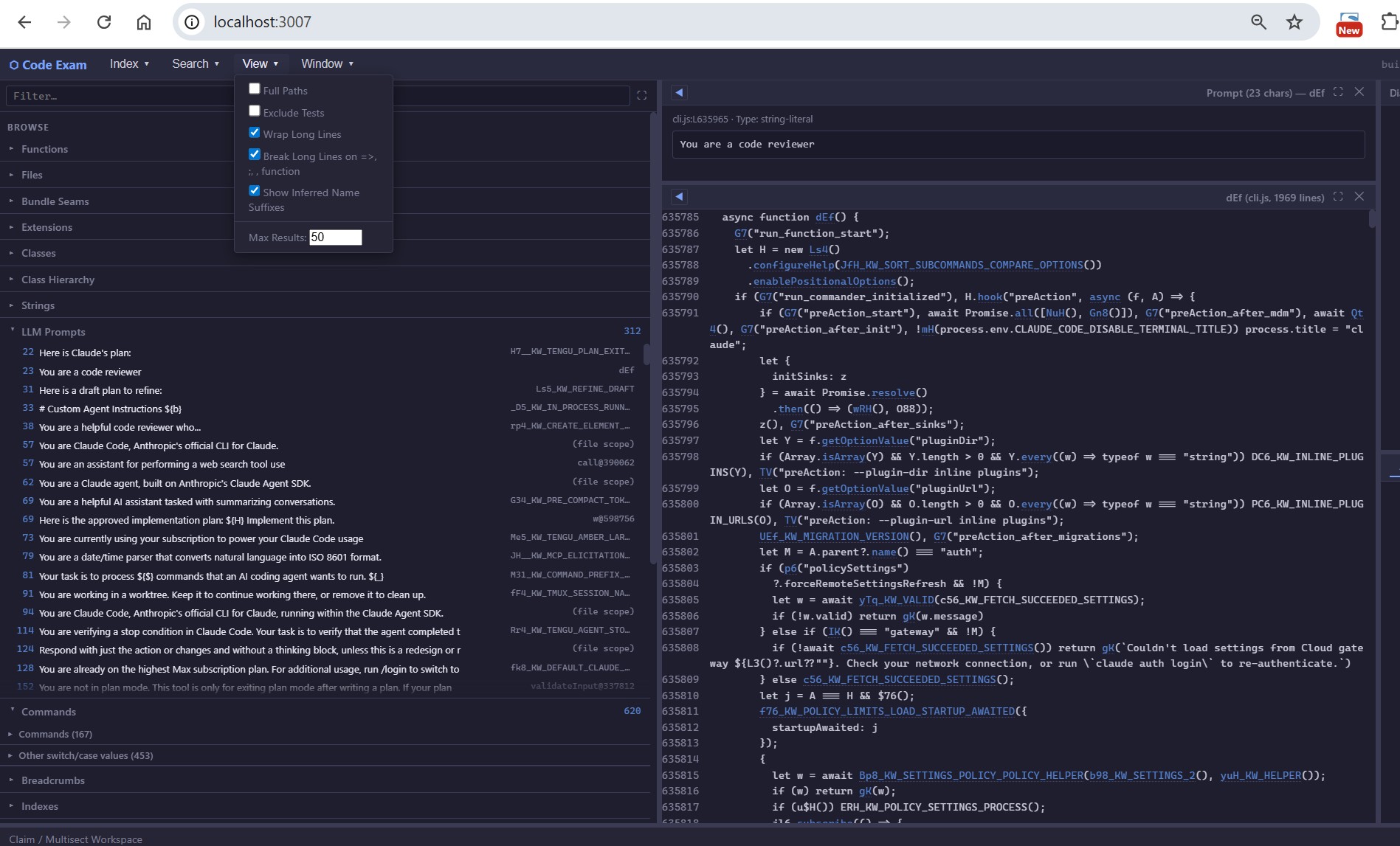
Prompt catalog — LLM prompts recovered from the minified cli.js bundled inside claude.exe
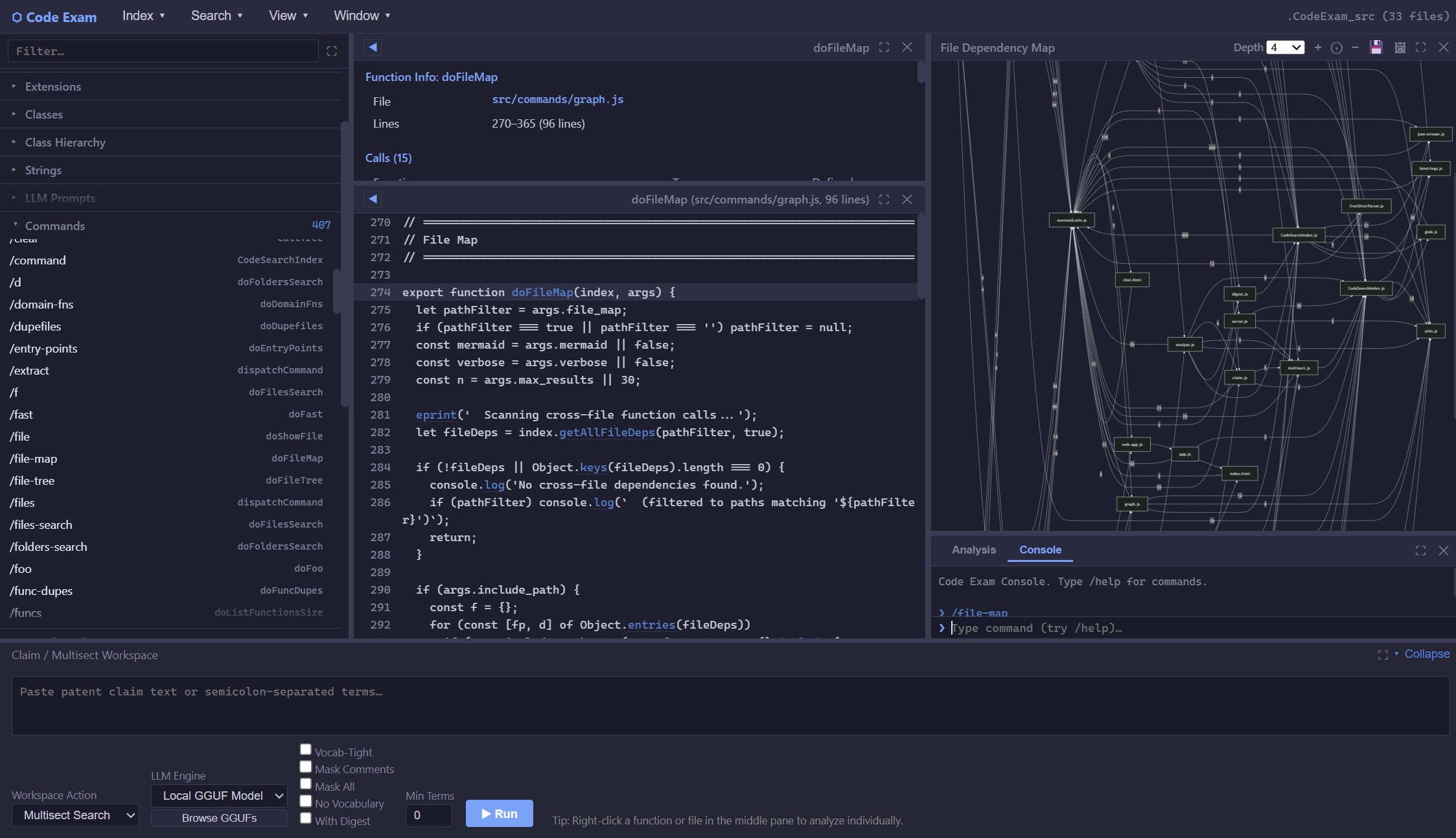
File-map view (April 2026 — slightly out of date, but representative)

Example of CodeExam AI/ML accordions, with example Pipeline for Mistral code from GitHub
Feature highlights
Browse and search
- Function/file/class accordions; full-text, regex, and inverted-index (
--fast) search. - Multisect: find the smallest scope — function, class, or file — containing substantially all of N search terms. Each term can be hard-required, negated (
!term/NOT term), or soft (?term— optional: it does not gate the result set but still boosts ranking). Prose — a patent claim, a design spec, a bug report — can be parsed directly into a multisect expression (--claim-search). - Cross-reference: callers, callees, transitive call trees, file and folder coupling maps. Mermaid diagrams for call trees and coupling maps; individual caller/callee lists are tabular.
- Function / class / file digests — concise per-target summary (identity, callers, callees, distinctive strings, structural shape, inheritance chain + known subclasses for classes, imports/exports for files) usable standalone or as input to LLM prompts. Class digests walk the ancestor chain and surface known subclasses with method-override counts. (Reliable class-hierarchy tracking in static examination — especially for C++ — is still being hardened; see #65 and #60.)
Metrics and code-surfacing
Where to start looking in an unfamiliar codebase. These are useful today but under active refinement — some (notably hotspots and gaps) are still being tuned toward their intended sharpness.
- Hotspots / class hotspots / most-called — complexity- and centrality-ranked functions and classes.
- Domain-function ranking and entry points — the functions most characteristic of, or at the edges of, the codebase.
- Dead-code gaps — references that don’t resolve to indexed source, declared dependencies, or the standard library.
- Vocabulary / nomenclature discovery — the project-specific terms a codebase centers on, surfaced by cross-document TF-IDF (with a per-function fallback for single-file / bundled corpora).
Catalogs of “what does this code do” / “where should I start reading”
- Command catalog — detected CLI options, slash-commands, and (where recognizable) menu items and dialog actions in the target codebase, linked to handler functions or methods (so a
/skillsentry in a chat tool resolves to its actual handler in the source). Heuristic — some shapes (e.g., chained Commander.js declarations) are still under-detected. - Breadcrumbs — telemetry markers (logging, analytics, audit calls) with their associated functions, useful for tracing what an obfuscated binary actually reports back.
- AI/ML and LLM-app code — extensive catalogs of the AI/ML and LLM-app constructs in a codebase (models, LLM calls, tools, chains, prompts, and more) — see AI/ML and LLM-app detectors below.
- Vocabulary — TF-IDF-ranked domain-specific terms and nomenclature, surfacing what a codebase is “about” (
--vocabulary/--vocab). - Metrics — code-surfacing rankings (hotspots, complexity, most-called, domain-specific functions) for finding where to start reading.
Deobfuscation, renames, and fingerprints
- Detects esbuild / minified JS and prettifies via
js-beautify. - Optional
webcrackfor bundle disassembly (≤500 KB files). - Auto-infers readable names from obfuscated code (toggle off with
--no-rename):_KW_keyword inference from string literals_NAME_recovery from__name(fn, "originalName")esbuild helpers_IMPORT_resolution from import bindings_CMD_recovery for command/route/skill handler functions
- Funcstrings — a distinctive-string + call signature per function. Resilient to esbuild/webpack transforms. The goal is to match a bundled
cli.jsfunction back to its source-library equivalent; this works in controlled cases (see thefranken.fp.jsonexample below) but reliably identifying generic library code — e.g. C-runtime functions likefopen/printfin a stripped binary — is still in progress. Two access shapes: full funcstring (--show-funcstring) for human inspection, and funcstring hashes (--funcstr-hashes) for cross-index intersection. - Portable fingerprint files (
*.fp.json) — fingerprint a curated reference library once, then match the resulting.fp.jsonagainst any working index without redistributing the library’s source. Generate with--build-fp-renames; the working example shipped today isfranken.fp.json. Matches surface as_FP_-prefixed names. - Multiple types of duplication detection: exact (SHA1), near-duplicate, and structural-dupe (AST-shape hashing for non-bundled code). Dupes are preserved, not collapsed.
The reason CodeExam spends so much machinery on duplicate detection is not the obvious one (avoiding re-analysis): it’s the inverse use. The same signatures that find duplicates are what let you identify unknown code by matching it against known reference code, and trace function lineages — three near-dupes evolved from a common ancestor — across versions or forks.
The richness here is that there are complementary signature types, and deliberately so, because each survives a different kind of transformation:
- Structural / near-dupe signatures (AST-shape and near-duplicate hashing) are naming-independent — they still match after a rename pass or minification has mangled every identifier, because they key on the shape of the code, not its names.
- Funcstrings are a naming-dependent, extrinsic signature — distinctive string literals plus the external API calls a function makes. They key on what the code says and calls rather than its shape, and survive the inverse transformation: restructured control flow whose strings and call targets are unchanged.
- LLM analysis (
--analyze) is the higher-cost adjudicator for the hard cases neither structural nor extrinsic signatures resolve on their own, reasoning about the code in context.
No single signature is sufficient on its own; used together — structural, extrinsic, and (for the residual hard cases) LLM-assisted — they identify unknown code far more reliably than any one of them.
AI/ML and LLM-app detectors
A group of heuristic detectors that surface the AI/ML and LLM-app constructs in a codebase — available both as a left-pane AI/ML section in the GUI and as matching CLI flags (--pipelines, --models-used, --llm-calls, …; each has a --list-<name> alias). They span classic ML (PyTorch / HF Transformers / scikit-learn) and LLM-application code (SDK calls, tools, agent/chain frameworks). Detection is pattern-based — it favors recall and is honest about its misses, and distinct names are kept rather than over-collapsed.
Three views lead:
- AI/ML Pipelines (inferred) — the connected-flow overview. CodeExam infers end-to-end pipelines (RAG, training, inference, agent, LLM-app) from the co-occurrence of the component cells below, so you see how the pieces wire together instead of a flat list. The best lead-in to an unfamiliar AI codebase.
- Models Used — the named models actually loaded or called across the whole codebase, deduped and labeled api-vs-local (an API id like
gpt-4o, a.ggufpath, a Hugging Face repo id). Distinct from Models (defined) below, which lists model classes (nn.Module/ Keras / scikit-learn subclasses). - Prompts — the prompt catalog (relocated here from Catalogs): detected LLM prompts, with composite expansion — ternary branches,
${var}templates, and[…].join(…)assemblies merged into one searchable entry per logical prompt. Detects inline strings,getSystemPrompt/systemPrompt:,role:"system"messages, and.mdskill files.
The component detectors the Pipelines view synthesizes from — each also a standalone list (GUI accordion + CLI flag):
- LLM Calls — SDK calls / endpoints (
messages.create,ChatOpenAI,LlamaChatSession). - Tools — tool / function-calling defs and dispatch (
@tool,input_schema, MCP). - Chains / Agents — orchestration via LangChain / LangGraph / DSPy / CrewAI.
- Embeddings / Vectors — embedding and vector-search sites (FAISS / Chroma, similarity search).
- Structured Output — schema-constrained output (
with_structured_output,response_format, parsers). - Inference — local generation / prediction (
generate,no_grad,.predict). - Training — training sites (PyTorch loops, HF
Trainer,.fit). - Datasets — dataset definitions and loaders (
Dataset/IterableDataset,tf.data). - Artifacts — model load/save sites (
from_pretrained, GGUF, safetensors). - Models (defined) — model classes by inheritance (
nn.Module/ Keras / scikit-learn). - Kernels — GPU kernels (CUDA
__global__, Triton@triton.jit, numba). - Multimodal / Vision — vision encoders (CLIP/ViT), CNN architectures (ResNet/conv), object detection/segmentation (YOLO/SSD/DETR/U-Net), generative (diffusion/VAE).
- Post-training / Fine-tuning — fine-tuning & alignment mechanisms (LoRA/PEFT/adapters, SFT/DPO/PPO/GRPO, distillation), distinct from pretraining.
- Reasoning / CoT — chain-of-thought and reflection prompt language (
step by step,chain-of-thought, reflection/scratchpad). A heuristic signal over prompt text, not a structural-reasoning detector.
Quasi-Source: recovering structure from non-source artifacts
The thesis tying several features together: a surprising amount of useful structure can be recovered from things that weren’t shipped as source, then indexed, searched, and cross-referenced with the same machinery as real source. The minified-JS deobfuscation and fingerprinting above are part of this spirit; the two surfaces below extend it to compiled and packaged artifacts. (Tracked as an umbrella in issue #76.)
Binary-code analysis
- Indexes binary files (executables, libraries) inside source trees by extracting strings AND demangled C++ function signatures (Itanium and MSVC name mangling).
- Granularity today: one pseudo-function per binary file, containing the file’s extracted strings and demangled symbols. Search and the inverted index work on these uniformly with source content; per-function call/caller analysis does not apply to binary content.
- Most useful for large binary corpora — Windows 11 system DLLs, Microsoft Office plugin trees, vendor SDKs — where the per-file string-plus-symbol fingerprint is enough to navigate at scale.
Binary-bundled JavaScript extraction
--extract-js-from-binary <path>recovers embedded JavaScript from native install binaries and writes it to a directory CodeExam can index normally. Format-aware dispatch: currently supports Bun standalone executables (used by Claude Code’sclaude.exe), including PE-signed Windows builds where the Bun trailer sits before the Authenticode certificate. Other formats (pkg, nexe, Node SEA, Tauri asset-table) are tracked as future work.
LLM-assisted (optional)
--analyze <function>— Claude (or a local GGUF model) explains a function in context.- Multisect Analyze — runs a multisect search, then has the LLM produce a structured per-term verdict grid: each search term is rated
PRESENT/NAME-ONLY/IFFY/ABSENTwith supporting evidence and a confidence level, so you can see at a glance how each term maps onto the matched function. --claim-search <prose>— extracts search terms from descriptive text (a patent claim, a spec, a requirement), multi-sects to find matching code, optionally LLM-summarizes each match.- Input masking — strip comments, mask string literals, mask identifier names before sending a function to an LLM. The primary point is to force the model to reason about logic rather than leaning on comments or naming heuristics — both of which can mislead, especially in obfuscated bundles where the names were inferred. (Masking also suppresses some incidental data leakage, but it’s not a hard security boundary — strings may still leak depending on configuration.)
--build-prompt <function>— generates a digest+source prompt suitable for hand-pasting into any LLM (no API needed). Use this to feed CodeExam findings to a chat tool while keeping source local.- Offline operation via a local GGUF model under
node-llama-cpp. Suitable for code review under Court Protective Order where outbound network requests are prohibited. Model compatibility tracks thellama.cppbundled insidenode-llama-cpp: current “local hero” (LLM that produces reasonable CodeExam results) in air-gapped mode with no internet connection, on consumer-grade hardware) is Google’s Gemma-3-12B, running on Nvidia RTX4090 with 24GB VRAM; Qwen 3.5 is also supported.
A candid caveat on the local path: a local GGUF model is not as capable as a frontier API model like Claude. CodeExam compensates by feeding local models simpler prompts with narrower expectations, and the resulting output is often not as good as the Claude-API path. Closing that gap is a major ongoing focus — better hardware (a capable GPU) and/or loading larger local models should both help.
Index management
- Pure-Node streaming JSON parser handles 5 GB+ indexes.
- Build from directories, glob patterns, archives (zip/tar/gz), or
@filelistfiles. - Query several indexes in a single run with
--multi-index @indexlist. - Multi-language parser via tree-sitter WASM grammars + regex fallback:
- Tree-sitter: C, C++, Java, JavaScript, TypeScript, Python, C#, Go, Rust, PHP, Ruby
- Regex-only: Swift, Kotlin, Scala, Lua, Objective-C, CoffeeScript, Perl, VBScript, AWK
Why a plain inverted index rather than a vector database or SQL? Readers coming from recent tooling often expect a vector store (ChromaDB, FAISS) or a relational database, and assume either would be preferable to “plain text in JSON.” The choice is deliberate. Exact and regex code search wants lexical precision, not nearest-neighbor approximation, so embeddings buy little for the core browse-and-cross-reference workload. Keeping the index as inverted-index structures serialized to JSON makes it transparent, diffable, and trivially portable across machines — there is no database server to stand up and no opaque binary store. Semantic / embedding search — vector similarity, and lighter-weight options such as small specialized models for retrieval — is something we’re exploring as a layer on top of the lexical index rather than a replacement for it (backlog: RAG-style retrieval and embedding/small-model term extraction, TODO #201 / #202); it is not part of the core today.
Architecture
CLI            Interactive       GUI server      MCP server
(index.js)    (interactive.js)  (server.js)     (mcp-server.js)
       \           |                |               /
        \          |                |              /
         CodeSearchIndex  ←  the engine
         (src/core/)
              ├── CodeSearchIndex.js     (index build, query API)
              ├── TreeSitterParser.js    (multi-language AST parsing)
              ├── rename.js              (_KW_, _CMD_, _NAME_, _IMPORT_ inference)
              ├── calls.js               (caller/callee graph)
              ├── multisect.js           (smallest-scope-containing-all-terms)
              ├── vocabulary.js          (domain-vocabulary discovery)
              ├── breadcrumbs-commands.js  (telemetry + command catalog)
              ├── hotspots.js            (complexity metrics)
              ├── canonical-funcs.js     (canonical-form normalization)
              ├── distance-helpers.js    (string + structural distance)
              ├── structural-fingerprint.js  (AST-shape hashing)
              ├── bundle-seam-detection.js   (esbuild module boundaries)
              └── CSI-helpers.js         (shared utilities)

src/commands/  (per-feature command modules invoked by the CLI / REPL /
                MCP / GUI dispatchers)
  ├── search.js, browse.js, callers.js, graph.js
  ├── metrics.js, dedup.js, multisect.js
  ├── digest.js, prompts.js, claim.js, analyze.js
  ├── fingerprint.js, build_fp_renames.js
  ├── extract_js_from_binary.js
  └── interactive.js  (REPL, used standalone and from the GUI Console)

public/  (GUI, modular ES extracts from the former monolithic app.js)
  ├── app.js              (top-level wiring)
  ├── state.js, api.js, dom-utils.js
  ├── click-handlers.js, context-menu.js
  ├── chrome — dialogs.js, overlays.js, console.js, layout.js
  ├── mermaid.js, source-viewer.js
  ├── prompts-and-catalog.js, menu-bar.js
  ├── middle-pane.js, list-renderers.js
Requirements
- Node.js 18+ (ES modules,
node:test). npm installto fetch runtime dependencies (Anthropic SDK, Express, MCP SDK, web-tree-sitter, js-beautify, webcrack, node-llama-cpp, Mermaid renderers — seepackage.json).- Tree-sitter grammars vendored separately in
grammars/. - For local LLM inference: a GGUF model file. Compatibility is uneven and tracks the
llama.cppbundled innode-llama-cpp— older architectures load (e.g. Qwen 3), the newest (Gemma 4, Qwen 3.5) currently fail (#75). If a recent model won’t load,npm update node-llama-cppto pick up a newer bundledllama.cppis the cheapest first thing to try. As noted above, currently Google’s Gemma-3-12B, running on Nvidia RTX4090 with 24GB VRAM is supported, as is supported.
Standalone executable (Windows)
A single-file codeexam.exe can be built so users without Node, npm, or Bun installed can run CodeExam directly. v0 is Windows-only (#78); macOS and Linux builds are deferred.
Build:
npm install                  # if you haven't already
npm run build:exe            # requires Bun on the developer machine
                             #   winget install Oven-sh.Bun
This invokes bun build --compile --target=bun-windows-x64 via scripts/build-exe.js and writes dist/codeexam.exe (~100 MB — the size is dominated by the bundled Bun runtime, not by CodeExam itself) plus two sibling directories that must travel with the exe: dist/grammars/ (tree-sitter WASMs, for --use-tree-sitter parsing) and dist/public/ (GUI assets, for --gui mode). Ship dist/ as a single zip.
Run:
codeexam.exe --build-index <source-dir>     # CLI: behaves as `node src/index.js`
codeexam.exe --gui                          # GUI: starts server + opens browser
codeexam.exe --gui --port 9000              # override default port (8080)
With no --index-path, --gui looks for a .code_search_index directory in the current folder. If it isn’t there, the GUI still comes up — just empty — and you can point it at an index with Load Index from the menu, or build one first with --build-index. (Shipping a small ready-to-browse sample index alongside the exe is on the list, so a first-run GUI has something to show.)
Windows SmartScreen warns “Windows protected your PC” on first run of an unsigned exe. Click More info → Run anyway. v0 ships unsigned; Authenticode code signing for public distribution is a future follow-up.
Lite build (no local-LLM): if bun --compile can’t bundle the node-llama-cpp native module on your platform, build with npm run build:exe -- --no-llm. The resulting exe runs everything except semantic-search / local-GGUF features.
Testing
npm test # node --test "test/test_*.js"
~400 tests across the test suite, covering the indexing engine, search, multisect, cross-reference, fingerprinting, dedup, and the LLM-assisted command layer. The suite runs green on Windows and Unix-likes. GUI tests are not yet automated — GUI test automation built on XMLUI is under evaluation (see #73’s feasibility study).
Operating without a network
The GUI binds to localhost, the MCP server uses stdio, and outbound network requests are opt-in and gated. Combined with the optional local-GGUF path, CodeExam can run a full examination workflow without any network access — appropriate for litigation, security review, or any context where source must stay local. The one honest trade-off is capability: the local-GGUF path is less capable than the Claude-API path (see the LLM-assisted notes above), so the non-LLM machinery does most of the work in a fully air-gapped run and LLM output quality is generally below what the API would produce.
Known limitations
- File-path lookup on Windows / mixed separators (#67) — paths CodeExam displays (e.g.
ace\examples\test.cpp) don’t always round-trip as input to path-taking commands (--digest,--show-file,--extract,--callers, …). Workaround: use a bare filename, which suffix-matches (--digest test.cpp). Under investigation. - Local-LLM model coverage and quality (#75) — newest GGUF architectures (Gemma 4) fail to load; older ones work (in particular, Gemma3, Qwen3.5). Separately, local-model output quality lags the Claude-API path. See Requirements.
- Command-catalog false positives (#66) —
--command-catalogand the command section of--digestcan surface regex fragments or example strings as if they were commands. Being tightened. - GUI test automation — not yet in place; evaluating an XMLUI-driven approach (#73).
Related: CodeClaim
A patent-focused build, tailored for IP-litigation workflows, is developed under the name CodeClaim. CodeClaim shares the CodeExam engine and adds more extensive claim-specific extraction — including the use of dependent claims and the patent specification, and user-supplied claim-construction alternatives — together with term-mapping and reporting such as claim charts.
