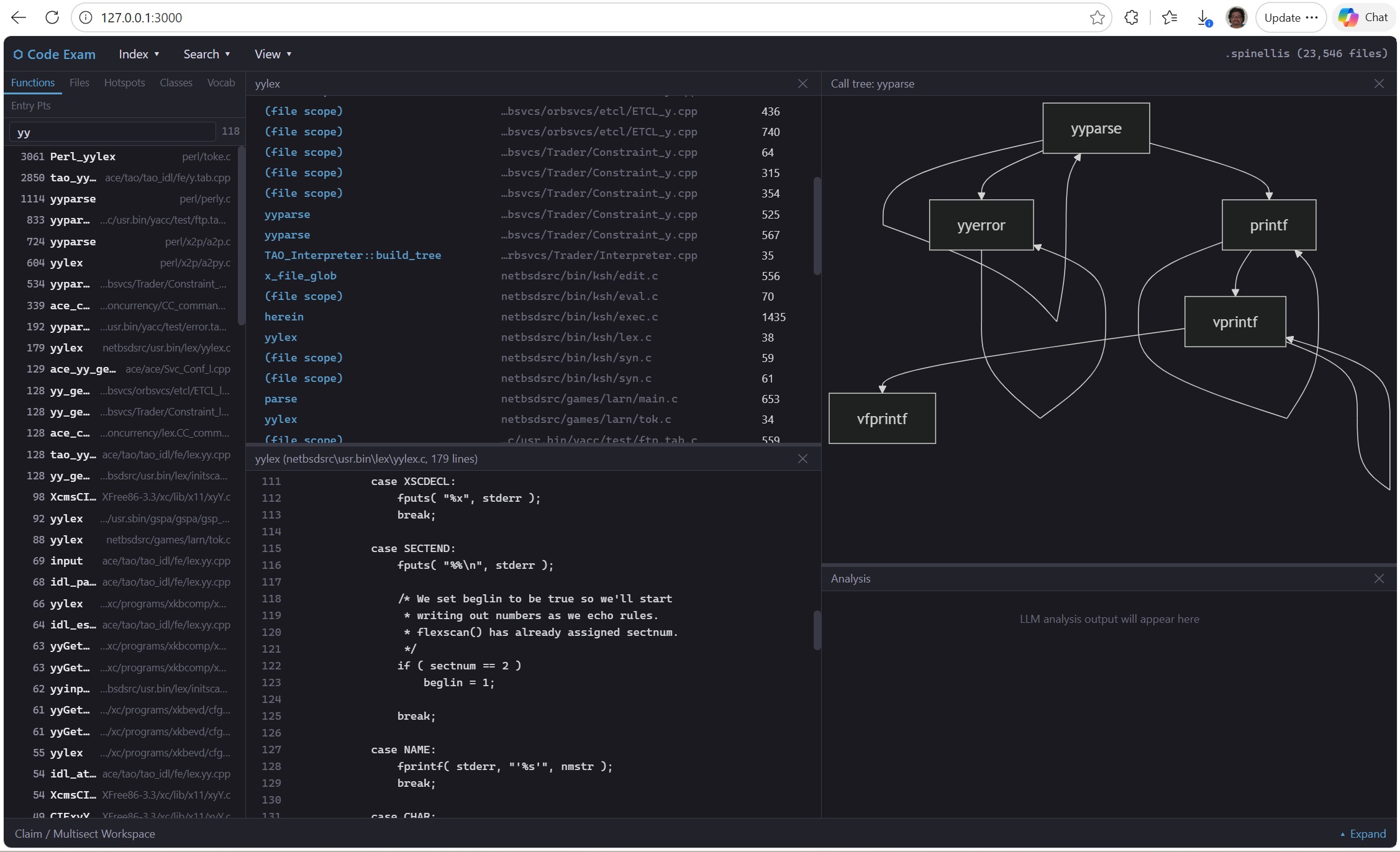
I’m not ready to release the CodeExam tool I’ve been building with Claude. Right now it is command line, using Node.js. An earlier version (earlier here = about a week ago) is in Python. It has been tested on multiple-gigabyte codebases. An initial GUI version, supporting only a handful of commands so far, looks like this:
In places where the tool uses AI (so far primarily in extracting search terms and synonyms from patent-claim text or other English-language text; and in analyzing the applicability of a patent claim to selected code functions), it has mostly been tested with the Claude AI. Obviously, for “air gapped” use on a locked-down computer under a Court Protective Order, any AI use must exclusively be with a local LLM. So far, Qwen Coder is proving vastly superior to (and faster than) DeepSeek Coder or CodeLlama.
For now, to provide some idea of what this tool already can do, here is the –help message:
C:\work\code_exam\Nodejs_port\code-exam>node src\index.js –help
code-exam – Air-Gapped Source Code Examination Tool (Node.js)
Version: 0.1.0 (Node.js port)
USAGE:
node src/index.js [options]
INDEX MANAGEMENT:
–build-index <path> Build index from directory, file, glob, or @filelist
–rebuild-functions Rebuild function index from loaded file contents
–index-path <path> Path to index directory (default: .code_search_index)
–skip-semantic Skip semantic/embedding indexing (default)
–use-tree-sitter Use tree-sitter for function parsing
–extensions <exts> Comma-separated file extensions to index
–exclude-extensions <exts> Comma-separated extensions to exclude from index
–demangler <path> Path to C++ name demangler (e.g., vc++filt.exe, c++filt)
SEARCH:
–search <query> Hybrid search (literal + semantic)
–literal <query> Literal/exact text search
–fast <query> Fast inverted-index search
–regex <pattern> Regex pattern search
–files-search <query> Show files containing a term, sorted by hit count
–folders-search <query> Show folders containing a term, sorted by hit count
BROWSE:
–stats Show index statistics
–list-files [pattern] List indexed files (optional filter)
–show-file <pattern> Display entire file contents
–list-functions [pattern] List functions (optional filter)
–list-functions-alpha List all functions alphabetically
–list-functions-size List all functions sorted by size
–extract <spec> Extract function source: FUNCTION or FILE@FUNCTION
–follow-calls With –extract: also dump source of all callees
–deep [N] Same as –follow-calls, optionally N levels deep (default: 1)
–comments-only With –extract: show only full-line comments from the code
–scan-extensions <path> Count file extensions in a directory
–index-extensions Count file extensions in current index
–list-indexes [path] List available index directories
DISPLAY / FILTERING (query-time, does not affect index build):
–max-results <n> Maximum results to display (default: 20)
–context <n> Context lines around matches (default: 3)
-v, –verbose Show extra detail
–full-path Show full file paths in output
–filter <text> Filter function listings by name
–include-path <patterns> Only include paths containing pattern(s)
–exclude-path <patterns> Exclude paths containing pattern(s)
–exclude-tests Exclude test files from callers/metrics results
–dedup <mode> Dedup mode: none, exact, structural
MODE:
-i, –interactive Start interactive REPL mode
(auto-enters if no command given and index exists)
CALLERS / CALLEES:
–callers <spec> Find callers of a function (FUNC or FILE@FUNC)
–callees <spec> Find functions called by a function
–most-called <n> Show top N most frequently called functions
–depth <n> Depth for transitive callers (default: 1) or call-tree (default: 3)
–min-name-length <n> Filter out short names in –most-called (default: 1)
–include-macros Include ALL_CAPS names in –most-called
–defined-only Only show functions defined in the index
GRAPH:
–call-tree <spec> Show call tree (callers up + callees down)
–file-map [filter] Show file-level dependency map
–file-tree <file> Show file dependency tree
–mermaid Output Mermaid diagram instead of text
METRICS / DISCOVERY:
–hotspots <n> Top N structurally important functions (calls x log2(lines))
–hot-folders <n> Top N directories by aggregated hotspot score
–entry-points <n> Top N uncalled functions (sorted by size)
–max-calls <n> Max call count for entry-points (default: 0 = never called)
–gaps [n] Find suspicious dead code (defined, no callers, not entry-point)
–domain-fns <n> Top N domain-specific functions (score / sqrt(name defs))
–list-classes List all classes with method counts/sizes
–class-hotspots <n> Top N classes by aggregated method hotspot score
–discover-vocabulary <n> Top N domain-specific tokens by TF-IDF score (aliases: –vocabulary, –vocab)
–multisect-search <terms> Multi-term intersection search (semicolon-separated terms)
Finds smallest scope (function/file/folder) containing all terms
Terms in /…/ are regex. Prefix with NOT or ! to negate.
Use –min-terms N for partial matching.
–in <pattern> Restrict vocabulary scan to files whose path matches pattern
–show-dupes Show file duplicate paths in output
CLAIM SEARCH (LLM-based patent claim analysis):
–claim-search <text> Extract search terms from patent claim text (or @file.txt)
–claim-file <path> Read patent claim text from file
–use-claude Use Claude API for term extraction (requires ANTHROPIC_API_KEY)
–api-key <key> Anthropic API key (overrides ANTHROPIC_API_KEY env var)
–claim-model <path.gguf> Use local GGUF model for term extraction (alias: –term-extract-model)
–temperature <float> LLM temperature (default: 0.0)
–show-prompt Display the LLM prompt and exit (no API call)
–vocab-tight Also use codebase vocabulary for TIGHT term generation
(default: vocabulary only influences BROAD terms)
–no-vocabulary Disable codebase vocabulary in term extraction prompts
(alias: –no-vocab) For A/B testing vocabulary guidance.
LLM ANALYSIS:
–analyze <function> Analyze a function with LLM (“what does this do?”)
–claim-analyze <claim> End-to-end patent claim analysis: extract terms, search,
analyze top matches. Takes @file.txt or inline text.
–multisect-analyze <terms> Search for functions matching terms, analyze top hits.
Same term syntax as –multisect-search.
–file-analyze <filepath> Analyze an entire source file with LLM
–analyze-model <path.gguf> Path to local GGUF model for analysis (air-gap safe)
–mask-all Strip comments and mask string contents before sending to LLM
–line-numbers Include source line numbers in LLM prompt
–claim-text <text> Patent claim text for –claim-analyze (or @file.txt)
DEDUP / DUPLICATES:
–dupefiles <n> Top N duplicate file groups by SHA1 hash
–func-dupes <n> Top N exact duplicate function groups (SHA1 body hash)
–near-dupes <n> Top N near-duplicate function groups (same name+size, different body)
–struct-dupes <n> Top N structural dupe groups (same structure, different names/values)
–show-funcstring [name] Show structural funcstring for a function (or for struct-dupes results)
–struct-diff <name> Show word-hole differences between structural dupe variants
–struct-diff-all <n> One-line diff summaries for top N structural dupe groups
EXAMPLES:
node src/index.js –build-index ./my-project
node src/index.js –stats
node src/index.js –fast “TODO”
node src/index.js –list-functions “main”
node src/index.js –extract “build_index”
node src/index.js –files-search “import” –max-results 50
node src/index.js –callers “search_literal”
node src/index.js –callees “main”
node src/index.js –most-called 20 –defined-only –min-name-length 4
node src/index.js –call-tree “build_index” –depth 3
node src/index.js –call-tree “build_index” –mermaid
node src/index.js –file-map –max-results 10
node src/index.js –file-tree “main.py” –depth 3
node src/index.js –hotspots 20
node src/index.js –hot-folders 15
node src/index.js –entry-points 20 –max-calls 1
node src/index.js –gaps
node src/index.js –domain-fns 20
node src/index.js –list-classes
node src/index.js –class-hotspots 15
node src/index.js –interactive # enter REPL
node src/index.js –index-path path/to/index # auto-enters REPL
node src/index.js –analyze tls_connect –use-claude
node src/index.js –claim-analyze @patent.txt –use-claude
node src/index.js –multisect-analyze “encrypt;key;cipher” –use-claude
node src/index.js –file-analyze crypto.c –use-claude –mask-all
Interactive mode help:
C:\work\code_exam\Nodejs_port\code-exam>node src\index.js –interactive
Code Exam Interactive Mode
Index: .code_search_index (50 files)
Type /help for commands, or just type a search query.
.code_search_index code-exam> /help
Code Exam Interactive Mode – Commands:
————————————————————-
SEARCH:
<query> Hybrid search (literal + semantic if available)
/literal <pattern> Literal text search
/fast <pattern> Fast inverted-index search
/regex <pattern> Regex pattern search
/files-search <term> Files containing term, sorted by hit count [alias: /fsearch]
/folders-search <term> Folders containing term, sorted by hit count [alias: /dsearch]
/max <N> Set max results for subsequent searches (default: 10)
FUNCTIONS:
/functions [filter] List functions (matches name AND path) [alias: /funcs]
/funcs PATH@NAME Filter by file path and/or function name
/funcs-size [N] [P] Top N largest functions (optional filter P)
/funcs-alpha [P] Alphabetical function list (optional filter P)
/extract <name> Extract function source (Class.method or Class::method)
/extract [N] Select from last multiple-match list
/extract <name> –follow-calls Also dump source of called functions
/extract <name> –comments-only Show only comments (combine with –follow-calls)
/extract <name> –deep=N Follow calls N levels deep
/file <path> Show entire file contents [aliases: /show-file, /cat]
/file [N] Select from previous multi-match list
CALLERS / CALL GRAPH:
/callers <name> Find callers of a function
/callees <name> Find callees (what does it call?)
/most-called [N] [defined] [macros] [filter=PAT]
/call-tree <name> [depth=N] [mermaid] Call tree (default depth 3)
/file-map [PATH] [mermaid] File-level dependency map
/file-tree FILE [depth=N] [mermaid] File dependency tree
METRICS / DISCOVERY:
/hotspots [N] [P] Most important: big + frequently called
/hot-folders [N] [P] Most important directories by hotspot score
/entry-points [N] [P] [max=N] Largest functions never/rarely called
/gaps [N] Find suspicious dead code
/domain-fns [N] [P] Domain-specific hotspots (rare names weighted higher)
/classes [P] [-v] List all classes with method counts
/class-hotspots [N] [P] Classes ranked by method hotspot score
/vocabulary [N] [P] Top domain-specific tokens by TF-IDF score (alias: /vocab)
MULTI-TERM INTERSECTION SEARCH:
/multisect t1;t2;t3 Find smallest scope containing all terms (aliases: /ms, /multi)
Supports –in <path>, min=N, NOT terms (!term or NOT term)
Terms in /…/ are regex. Prefix with NOT or ! to negate.
Options: min=N (partial matching)
CLAIM SEARCH (LLM-based patent claim analysis):
/claim <text> Extract search terms from claim text via Claude API
/claim @file.txt Read claim from file. Requires ANTHROPIC_API_KEY env var.
Options: min=N, –show-prompt
LLM ANALYSIS (requires –use-claude or –analyze-model):
/analyze <function> Analyze a function with LLM (“what does this do?”)
/claim-analyze <claim> End-to-end: extract terms -> search -> analyze against claim
/multisect-analyze <terms> Search for terms, analyze top function hits
/file-analyze <path> Analyze an entire source file with LLM
Options: –mask-all, –line-numbers, –show-prompt
DEDUP / DUPLICATES:
/file-dupes [N] [P] Duplicate file groups by SHA1 hash (alias: /dupefiles)
/func-dupes [N] [P] Exact duplicate function groups (SHA1 body hash)
/near-dupes [N] [P] Near-duplicate groups (same name+size, different body)
/struct-dupes [N] [P] Structural dupes (same structure, different names/values)
/funcstring <name> Show structural funcstring for a function
/struct-diff <name> Show word-hole differences between structural dupe variants
/struct-diff-all [N] [P] One-line diff summaries for top N structural dupe groups
INDEX INFO:
/stats Show index statistics
/index-extensions Show file extensions in current index
/files [filter] List indexed files (optional path filter)
/paths <pattern> Search file/folder paths only
OTHER:
/help Show this help
/set Show current settings
/set <key> <value> Change a setting (max, verbose, full-path, show-dupes)
/clear-cache Clear cached call counts (forces re-scan on next metrics command)
/rebuild-functions Rebuild function index with improved C++ parsing
!command Run an OS command (e.g., !dir, !grep pattern file)
/quit or Ctrl+C Exit interactive mode
OUTPUT REDIRECTION:
Any command can be followed by > or >> to redirect output to a file:
/hotspots 50 > hotspots.txt Write to file (overwrite)
/classes >> results.txt Append to file
PATH FILTER (–in):
Most commands accept –in <pattern> to restrict results to files whose path
contains <pattern>. Works with search, /hotspots, /vocab, /func-dupes, etc.
Examples:
recalc –in excel Search for ‘recalc’ only in files with ‘excel’ in path
/vocab –in torch Vocabulary specific to PyTorch files
/hotspots –in net Hotspot functions in networking-related files
/struct-diff-all –in office Structural diffs only in Office-related files
/file-map mermaid > map.mmd Save Mermaid diagram
