I’m not ready to release the CodeExam tool (likely to soon be renamed “CodeClaim”) I’ve been building with Claude Code. It is written using Node.js. It has been tested on multiple-gigabyte codebases. In addition to command line JS version, and an earlier version (earlier, working at Claude Code pace = a few weeks earlier) in Python, there is now a GUI version:
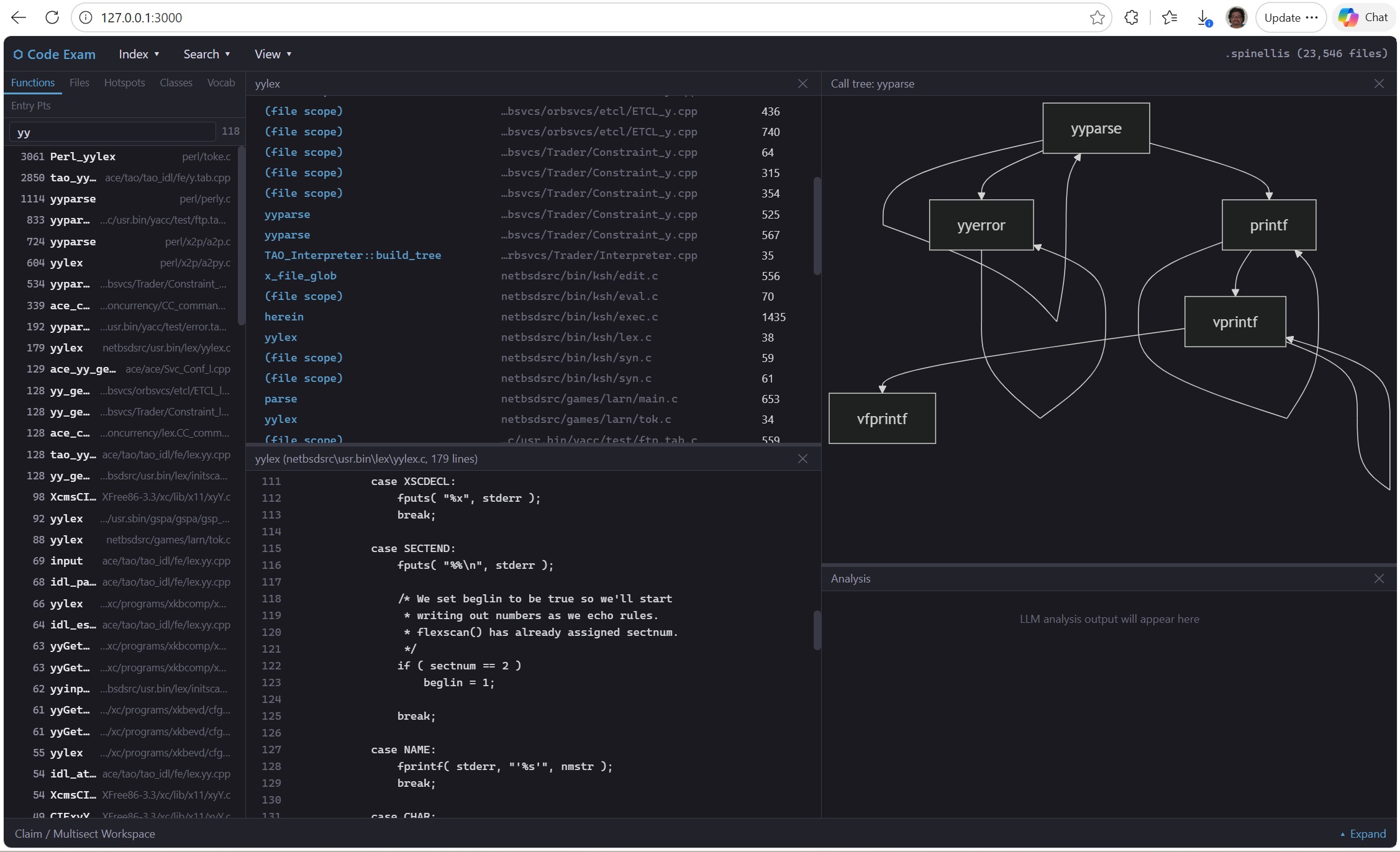
Interactive output from /file-map command, showing number of function-call links between files; nodes and edges in diagram are clickable:

Starting to make popups into prototype for semi-independent applets (with own threads etc.); clicking on nodes and edges in call-tree mermaid diagram generates “Relationship View” popup window (see below). Clicking on near-dupe or struct-dupe in left panel also generates pop-up windows:

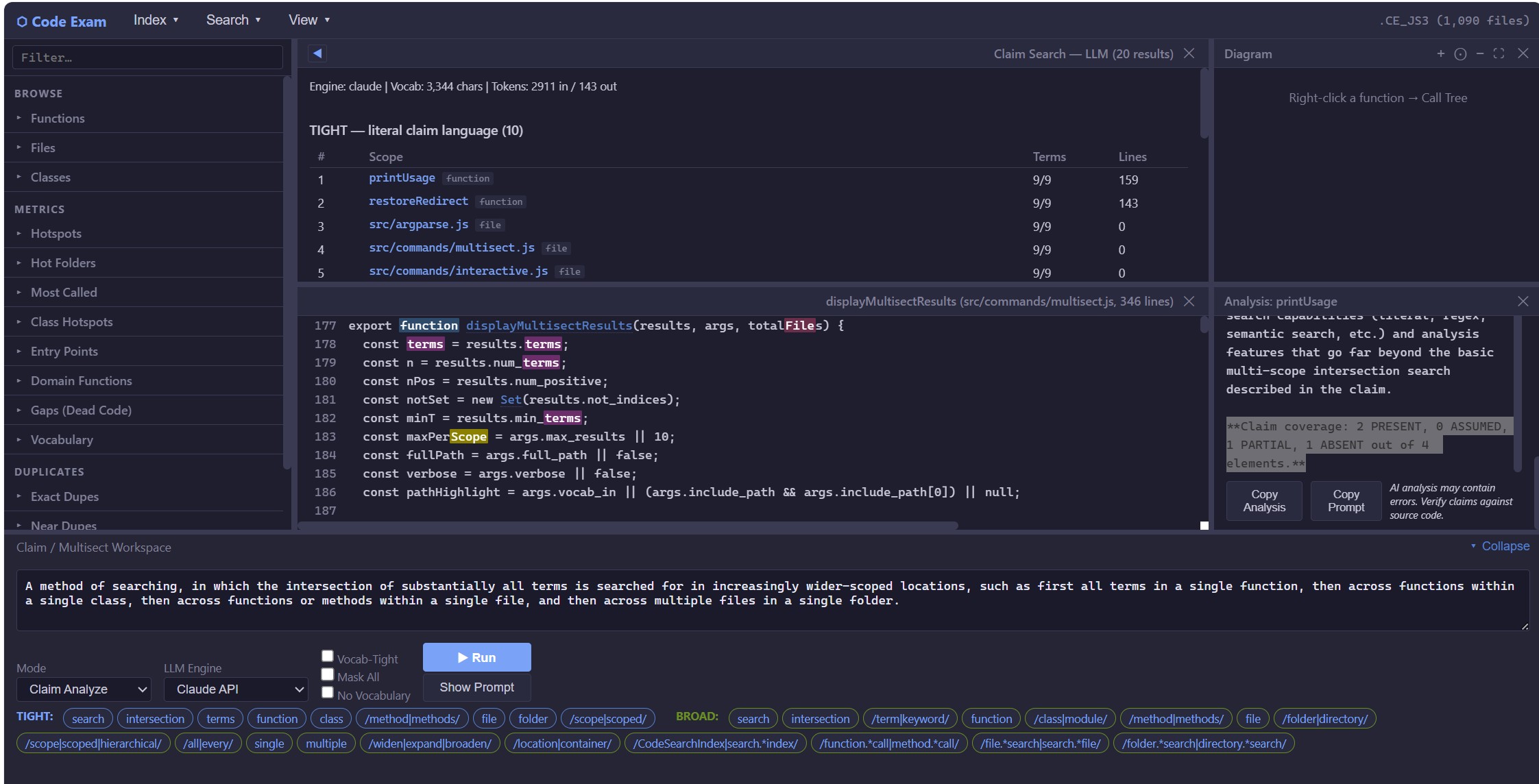
More features in place, including initial comparison of pseudo patent claim text against potentially relevant code (this is CodeExam’s “claim-analyze” feature):
Using MCP so that AI chatbot can invoke tools from the CodeExam engine, and using an entirely local LLM model (Qwen3-4B-Q5_K_M.gguf), beginning to implement CodeExam local AI Chat:

CodeExam has been built entirely with AI (first Claude then Claude Code). A different issue is the use of AI within the CodeExam program itself. For “air-gapped” use (source code examination on a local machine without internet connection), AI use cannot use an internet connection. In places where the tool uses AI (initially in extracting search terms and synonyms from patent-claim text or other English-language text; and analyzing the applicability of a patent claim to selected code functions), it has mostly been tested with the Claude API. Obviously, for “air gapped” use on a locked-down computer under a Court Protective Order, any AI use must exclusively be with a local model. So far, Qwen 2.5 Coder is proving vastly superior to (and faster than) DeepSeek Coder or CodeLlama. [And note Qwen 3.0 with MCP support, above.]
CodeExam command-line interface
To provide some idea of what this tool already can do, here is the –help message:
C:\work\code_exam\Nodejs_port\code-exam>node src\index.js --help

code-exam - Air-Gapped Source Code Examination Tool (Node.js)
Version: 0.1.0 (Node.js port)

USAGE:
node src/index.js [options]

INDEX MANAGEMENT:
--build-index <path> Build index from directory, file, glob, or @filelist
--rebuild-functions Rebuild function index from loaded file contents
--index-path <path> Path to index directory (default: .code_search_index)
--skip-semantic Skip semantic/embedding indexing (default)
--use-tree-sitter Use tree-sitter for function parsing
--extensions <exts> Comma-separated file extensions to index
--exclude-extensions <exts> Comma-separated extensions to exclude from index
--demangler <path> Path to C++ name demangler (e.g., vc++filt.exe, c++filt)

SEARCH:
--search <query> Hybrid search (literal + semantic)
--literal <query> Literal/exact text search
--fast <query> Fast inverted-index search
--regex <pattern> Regex pattern search
--files-search <query> Show files containing a term, sorted by hit count
--folders-search <query> Show folders containing a term, sorted by hit count

BROWSE:
--stats Show index statistics
--list-files [pattern] List indexed files (optional filter)
--show-file <pattern> Display entire file contents
--list-functions [pattern] List functions (optional filter)
--list-functions-alpha List all functions alphabetically
--list-functions-size List all functions sorted by size
--extract <spec> Extract function source: FUNCTION or FILE@FUNCTION
--follow-calls With --extract: also dump source of all callees
--deep [N] Same as --follow-calls, optionally N levels deep (default: 1)
--comments-only With --extract: show only full-line comments from the code
--scan-extensions <path> Count file extensions in a directory
--index-extensions Count file extensions in current index
--list-indexes [path] List available index directories

DISPLAY / FILTERING (query-time, does not affect index build):
--max-results <n> Maximum results to display (default: 20)
--context <n> Context lines around matches (default: 3)
-v, --verbose Show extra detail
--full-path Show full file paths in output
--filter <text> Filter function listings by name
--include-path <patterns> Only include paths containing pattern(s)
--exclude-path <patterns> Exclude paths containing pattern(s)
--exclude-tests Exclude test files from callers/metrics results
--dedup <mode> Dedup mode: none, exact, structural

MODE:
-i, --interactive Start interactive REPL mode
(auto-enters if no command given and index exists)

CALLERS / CALLEES:
--callers <spec> Find callers of a function (FUNC or FILE@FUNC)
--callees <spec> Find functions called by a function
--most-called <n> Show top N most frequently called functions
--depth <n> Depth for transitive callers (default: 1) or call-tree (default: 3)
--min-name-length <n> Filter out short names in --most-called (default: 1)
--include-macros Include ALL_CAPS names in --most-called
--defined-only Only show functions defined in the index

GRAPH:
--call-tree <spec> Show call tree (callers up + callees down)
--file-map [filter] Show file-level dependency map
--file-tree <file> Show file dependency tree
--mermaid Output Mermaid diagram instead of text

METRICS / DISCOVERY:
--hotspots <n> Top N structurally important functions (calls x log2(lines))
--hot-folders <n> Top N directories by aggregated hotspot score
--entry-points <n> Top N uncalled functions (sorted by size)
--max-calls <n> Max call count for entry-points (default: 0 = never called)
--gaps [n] Find suspicious dead code (defined, no callers, not entry-point)
--domain-fns <n> Top N domain-specific functions (score / sqrt(name defs))
--list-classes List all classes with method counts/sizes
--class-hotspots <n> Top N classes by aggregated method hotspot score
--discover-vocabulary <n> Top N domain-specific tokens by TF-IDF score (aliases: --vocabulary, --vocab)
--multisect-search <terms> Multi-term intersection search (semicolon-separated terms)
Finds smallest scope (function/file/folder) containing all terms
Terms in /.../ are regex. Prefix with NOT or ! to negate.
Use --min-terms N for partial matching.
--in <pattern> Restrict vocabulary scan to files whose path matches pattern
--show-dupes Show file duplicate paths in output

CLAIM SEARCH (LLM-based patent claim analysis):
--claim-search <text> Extract search terms from patent claim text (or @file.txt)
--claim-file <path> Read patent claim text from file
--use-claude Use Claude API for term extraction (requires ANTHROPIC_API_KEY)
--api-key <key> Anthropic API key (overrides ANTHROPIC_API_KEY env var)
--claim-model <path.gguf> Use local GGUF model for term extraction (alias: --term-extract-model)
--temperature <float> LLM temperature (default: 0.0)
--show-prompt Display the LLM prompt and exit (no API call)
--vocab-tight Also use codebase vocabulary for TIGHT term generation
(default: vocabulary only influences BROAD terms)
--no-vocabulary Disable codebase vocabulary in term extraction prompts
(alias: --no-vocab) For A/B testing vocabulary guidance.

LLM ANALYSIS:
--analyze <function> Analyze a function with LLM ("what does this do?")
--claim-analyze <claim> End-to-end patent claim analysis: extract terms, search,
analyze top matches. Takes @file.txt or inline text.
--multisect-analyze <terms> Search for functions matching terms, analyze top hits.
Same term syntax as --multisect-search.
--file-analyze <filepath> Analyze an entire source file with LLM
--analyze-model <path.gguf> Path to local GGUF model for analysis (air-gap safe)
--mask-all Strip comments and mask string contents before sending to LLM
--line-numbers Include source line numbers in LLM prompt
--claim-text <text> Patent claim text for --claim-analyze (or @file.txt)

DEDUP / DUPLICATES:
--dupefiles <n> Top N duplicate file groups by SHA1 hash
--func-dupes <n> Top N exact duplicate function groups (SHA1 body hash)
--near-dupes <n> Top N near-duplicate function groups (same name+size, different body)
--struct-dupes <n> Top N structural dupe groups (same structure, different names/values)
--show-funcstring [name] Show structural funcstring for a function (or for struct-dupes results)
--struct-diff <name> Show word-hole differences between structural dupe variants
--struct-diff-all <n> One-line diff summaries for top N structural dupe groups

EXAMPLES:
node src/index.js --build-index ./my-project
node src/index.js --stats
node src/index.js --fast "TODO"
node src/index.js --list-functions "main"
node src/index.js --extract "build_index"
node src/index.js --files-search "import" --max-results 50
node src/index.js --callers "search_literal"
node src/index.js --callees "main"
node src/index.js --most-called 20 --defined-only --min-name-length 4
node src/index.js --call-tree "build_index" --depth 3
node src/index.js --call-tree "build_index" --mermaid
node src/index.js --file-map --max-results 10
node src/index.js --file-tree "main.py" --depth 3
node src/index.js --hotspots 20
node src/index.js --hot-folders 15
node src/index.js --entry-points 20 --max-calls 1
node src/index.js --gaps
node src/index.js --domain-fns 20
node src/index.js --list-classes
node src/index.js --class-hotspots 15
node src/index.js --interactive # enter REPL
node src/index.js --index-path path/to/index # auto-enters REPL
node src/index.js --analyze tls_connect --use-claude
node src/index.js --claim-analyze @patent.txt --use-claude
node src/index.js --multisect-analyze "encrypt;key;cipher" --use-claude
node src/index.js --file-analyze crypto.c --use-claude --mask-all
Interactive mode help:
C:\work\code_exam\Nodejs_port\code-exam>node src\index.js --interactive
Code Exam Interactive Mode
Index: .code_search_index (50 files)
Type /help for commands, or just type a search query.

.code_search_index code-exam> /help

Code Exam Interactive Mode - Commands:
-------------------------------------------------------------
SEARCH:
<query> Hybrid search (literal + semantic if available)
/literal <pattern> Literal text search
/fast <pattern> Fast inverted-index search
/regex <pattern> Regex pattern search
/files-search <term> Files containing term, sorted by hit count [alias: /fsearch]
/folders-search <term> Folders containing term, sorted by hit count [alias: /dsearch]
/max <N> Set max results for subsequent searches (default: 10)

FUNCTIONS:
/functions [filter] List functions (matches name AND path) [alias: /funcs]
/funcs PATH@NAME Filter by file path and/or function name
/funcs-size [N] [P] Top N largest functions (optional filter P)
/funcs-alpha [P] Alphabetical function list (optional filter P)
/extract <name> Extract function source (Class.method or Class::method)
/extract [N] Select from last multiple-match list
/extract <name> --follow-calls Also dump source of called functions
/extract <name> --comments-only Show only comments (combine with --follow-calls)
/extract <name> --deep=N Follow calls N levels deep
/file <path> Show entire file contents [aliases: /show-file, /cat]
/file [N] Select from previous multi-match list

CALLERS / CALL GRAPH:
/callers <name> Find callers of a function
/callees <name> Find callees (what does it call?)
/most-called [N] [defined] [macros] [filter=PAT]
/call-tree <name> [depth=N] [mermaid] Call tree (default depth 3)
/file-map [PATH] [mermaid] File-level dependency map
/file-tree FILE [depth=N] [mermaid] File dependency tree

METRICS / DISCOVERY:
/hotspots [N] [P] Most important: big + frequently called
/hot-folders [N] [P] Most important directories by hotspot score
/entry-points [N] [P] [max=N] Largest functions never/rarely called
/gaps [N] Find suspicious dead code
/domain-fns [N] [P] Domain-specific hotspots (rare names weighted higher)
/classes [P] [-v] List all classes with method counts
/class-hotspots [N] [P] Classes ranked by method hotspot score
/vocabulary [N] [P] Top domain-specific tokens by TF-IDF score (alias: /vocab)

MULTI-TERM INTERSECTION SEARCH:
/multisect t1;t2;t3 Find smallest scope containing all terms (aliases: /ms, /multi)
Supports --in <path>, min=N, NOT terms (!term or NOT term)
Terms in /.../ are regex. Prefix with NOT or ! to negate.
Options: min=N (partial matching)

CLAIM SEARCH (LLM-based patent claim analysis):
/claim <text> Extract search terms from claim text via Claude API
/claim @file.txt Read claim from file. Requires ANTHROPIC_API_KEY env var.
Options: min=N, --show-prompt

LLM ANALYSIS (requires --use-claude or --analyze-model):
/analyze <function> Analyze a function with LLM ("what does this do?")
/claim-analyze <claim> End-to-end: extract terms -> search -> analyze against claim
/multisect-analyze <terms> Search for terms, analyze top function hits
/file-analyze <path> Analyze an entire source file with LLM
Options: --mask-all, --line-numbers, --show-prompt

DEDUP / DUPLICATES:
/file-dupes [N] [P] Duplicate file groups by SHA1 hash (alias: /dupefiles)
/func-dupes [N] [P] Exact duplicate function groups (SHA1 body hash)
/near-dupes [N] [P] Near-duplicate groups (same name+size, different body)
/struct-dupes [N] [P] Structural dupes (same structure, different names/values)
/funcstring <name> Show structural funcstring for a function
/struct-diff <name> Show word-hole differences between structural dupe variants
/struct-diff-all [N] [P] One-line diff summaries for top N structural dupe groups

INDEX INFO:
/stats Show index statistics
/index-extensions Show file extensions in current index
/files [filter] List indexed files (optional path filter)
/paths <pattern> Search file/folder paths only

OTHER:
/help Show this help
/set Show current settings
/set <key> <value> Change a setting (max, verbose, full-path, show-dupes)
/clear-cache Clear cached call counts (forces re-scan on next metrics command)
/rebuild-functions Rebuild function index with improved C++ parsing
!command Run an OS command (e.g., !dir, !grep pattern file)
/quit or Ctrl+C Exit interactive mode

OUTPUT REDIRECTION:
Any command can be followed by > or >> to redirect output to a file:
/hotspots 50 > hotspots.txt Write to file (overwrite)
/classes >> results.txt Append to file

PATH FILTER (--in):
Most commands accept --in <pattern> to restrict results to files whose path
contains <pattern>. Works with search, /hotspots, /vocab, /func-dupes, etc.
Examples:
recalc --in excel Search for 'recalc' only in files with 'excel' in path
/vocab --in torch Vocabulary specific to PyTorch files
/hotspots --in net Hotspot functions in networking-related files
/struct-diff-all --in office Structural diffs only in Office-related files
/file-map mermaid > map.mmd Save Mermaid diagram
